Using Strawberry Clipart and Seamless Patterns: Tips for Better Results
Strawberry clipart and seamless patterns bring a fresh, playful energy to digital and print projects. Whether you’re designing a brand identity for a juice bar, creating social media graphics for a summer campaign, or crafting educational materials about berries, these visual assets offer a quick way to add color and personality. Yet many people jump into downloading or purchasing these files without considering key details that affect the final outcome. With a little forethought, you can avoid common pitfalls and get the most out of your strawberry-themed designs.
What Strawberry Clipart and Seamless Patterns Really Offer
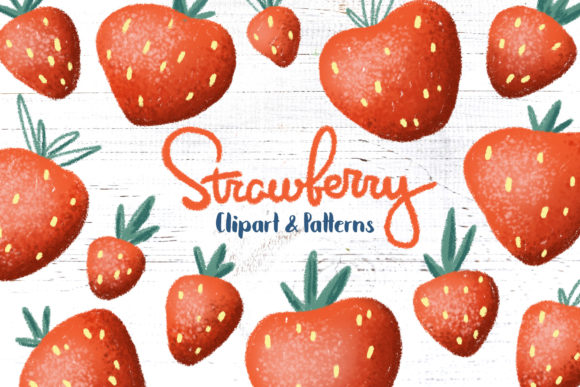
At its core, strawberry clipart consists of pre-made illustrations—individual berries, slices, leaves, or stylized icons—that you can insert into your work. Seamless patterns take this a step further: they repeat without visible edges, perfect for backgrounds, wrapping paper, fabric designs, or website textures. The appeal is obvious: you save time and still achieve a professional look. But that convenience can backfire if you choose the wrong file type, ignore licensing, or misuse the scale and placement of the pattern.
Mistake 1: Choosing Low-Resolution or Poorly Designed Assets
The most common error is grabbing the first free strawberry clipart you see without checking its resolution or overall quality. A 72 dpi image might look fine on screen but turn into a blurry mess when printed on a flyer or a product label. Similarly, clipart with harsh edges, awkward proportions, or outdated shading can make your project look amateur.
How this affects your work: Blurry prints, pixelated backgrounds, and inconsistent style undermine your credibility. If you’re a small business owner or freelancer, that first impression matters—customers notice sloppy visuals.
Better approach: Look for vector file formats like SVG, EPS, or AI. Vectors scale infinitely without losing quality, so you can use them on a business card or a billboard. If you prefer raster images, aim for at least 300 dpi for print and a transparent PNG for screens. Reputable marketplaces often provide previews, zoom-in options, and multiple size variants. Take the time to examine the preview at 100%; if the edges look jagged or the colors are muddy, skip it.
Mistake 2: Overlooking Licensing and Usage Rights
Strawberry clipart and patterns are often sold or shared under specific terms. A common misunderstanding is assuming that “free for personal use” means you can use it on merchandise you sell or on a client’s website. I’ve seen creators face takedown notices or unexpected fees because they used a pattern on a product that required a commercial license.
Real example: A hobbyist downloaded a cute strawberry pattern from a free site to make tote bags for a small market. The pattern’s license allowed personal use only. When an online shop buyer reported the design, the seller had to remove all products and pay a licensing fee retroactively.
What you should check before downloading: Read the license summary carefully. Look for terms like “personal use only,” “commercial use with attribution,” or “extended commercial license.” If the site doesn’t clearly state the license, consider that a red flag. Many platforms like Creative Market, Etsy, or Envato Elements include a license file with the download. Save it and keep it for your records, especially if you plan to use the asset in client work.
Mistake 3: Using Patterns Without Considering Scale and Color Harmony
Seamless patterns are powerful—but they can also overwhelm a design. A common mistake is dropping a pattern onto a full background at original size without adjusting the repeat scale. The result: a visually noisy surface that distracts from text or main images. Likewise, using a pattern with colors that clash with your palette makes the piece feel chaotic.
How it affects readability: If you’re designing a website header or a brochure, a large-scale strawberry pattern may obscure headlines or call-to-action buttons. On the flip side, a pattern that’s too small and repetitive can look like a cheap wallpaper.
Better approach: Treat the pattern as a supporting element. Scale it down so that the strawberries become a subtle texture rather than the main focus. Use a color picker to sample the pattern’s primary hues and match your overall palette. Many design apps (Canva, Photoshop, Illustrator) let you adjust pattern scale and opacity. Test the background with a text overlay to ensure contrast. Another smart trick: isolate a single strawberry clipart from the pattern and use it as a hero graphic, then place the same pattern at low opacity in the background for cohesion.
Mistake 4: Ignoring File Format Compatibility and Editing Needs
Not all strawberry clipart and seamless patterns work seamlessly with your software. A common oversight is downloading a file that requires a specific program you don’t have. For instance, a layered PSD file is great for Photoshop users but useless if you primarily use Canva or Affinity. Likewise, a JPG pattern might not tile perfectly because it lacks the transparent canvas needed for a true seamless repeat.
Real consequences: You waste time converting files, lose quality during conversion, or end up unable to change the strawberry color to match your brand.
What to look for: Prioritize universal formats. For clipart, SVG or EPS gives you maximum flexibility—you can change colors, resize without loss, and export to PNG. For seamless patterns, look for a PNG with a transparent background (often provided as a 12x12 inch tile at 300 dpi) and a separate PAT file if you use Photoshop. Many designers now also provide vector pattern swatches in AI and EPS formats. Check the product description for software compatibility. If you're a beginner, choose assets that explicitly say “compatible with Canva, SVG, and PNG.”
Before You Buy or Download: A Quick Checklist
Rather than rushing, take five minutes to evaluate each asset. This saves you disappointment and extra work.
- Read the description and customer reviews. Look for notes on color accuracy, file quality, and support.
- Verify the resolution and file format. Does it match your intended use—digital, print, or both?
- Check the license. Can you sell products with this design? Do you need to credit the creator?
- Preview the pattern repeat. Some marketplaces show a tiled preview. If the seam is visible or the pattern looks misaligned, skip it.
- Ask about customization. Can you change colors? Is the clipart offered in multiple poses or angles?
Putting It All Together: A Practical Workflow
Let’s say you’re designing a set of recipe cards for a strawberry-themed brunch event. You want a clean, elegant look with a small repeating pattern in the corner and a central clipart of a whole berry. Here’s a mistake-proof approach:
- Choose a vector clipart set that includes several strawberry angles—whole, sliced, and with leaves. This gives you flexibility.
- Pick a seamless pattern that complements the clipart but doesn’t steal attention. A subtle watercolor-style pattern at 50% opacity works well.
- Scale the pattern down so the repeats become a fine texture. Place it behind the title area, not behind the main text.
- Export your final design as a high-res PDF for print, and save a PNG version for sharing online. Keep the original editable file (SVG or AI) in case you need to adjust later.
This workflow respects the assets’ strengths and avoids the most common traps. You end up with a cohesive, professional look that feels intentional, not slapped together.
Final Thoughts
Strawberry clipart and seamless patterns are fantastic tools for creators at every level. They save time, spark creativity, and can elevate a project from ordinary to inviting. But the best results come when you treat these assets with the same care you give to your overall design: check quality, respect licensing, consider scale and color, and choose formats that truly work for your pipeline. Next time you’re about to download that cute berry illustration, pause and run through the simple checks above. Your future self—and your audience—will thank you.