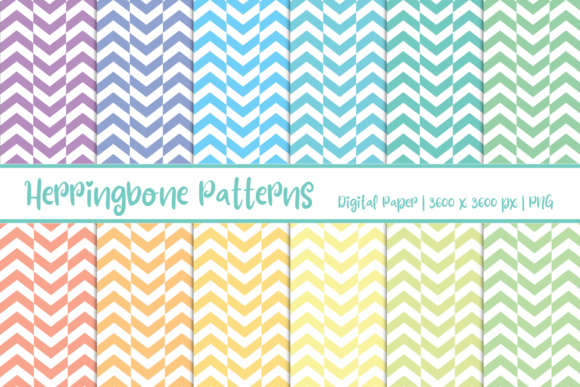
Herringbone Patterns Digital Paper: A Practical Guide
If you’ve spent any time browsing design resources or crafting templates, you’ve likely come across the term Herringbone Patterns Digital Paper. The name alone paints a picture of the classic chevron-like weave that has graced floors, textiles, and stationery for centuries. But what does it mean for digital projects? In short, it’s a collection of seamless, repeatable background textures that mimic the herringbone woven pattern, designed for use in graphic design, print-on-demand, digital planning, and countless other applications. Unlike physical patterned paper, the digital version is infinitely scalable, editable, and reusable—making it a versatile asset for anyone who needs a touch of timeless texture without the waste or cost of physical materials.
Whether you’re a creator looking for unique backgrounds, a business owner building brand assets, or an educator preparing visual materials, herringbone digital paper offers a blend of tradition and modern flexibility. In this guide, I’ll walk through what makes this pattern special, where it shines, and how to get the most out of it.
What Makes Herringbone Patterns Digital Paper Stand Out?
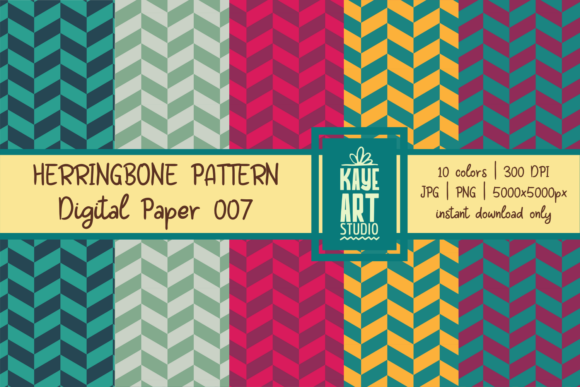
At its core, a herringbone pattern consists of a series of staggered, broken zigzags that create a V-shaped weave. This structure is immediately recognizable and carries a sense of craftsmanship and durability. When translated into digital paper, the pattern retains its geometric precision but gains key advantages that physical paper can’t match.
- Seamless repeatability: Most digital paper sets include tileable images, meaning you can fill any area—large or small—without visible seams. This is crucial for websites, backgrounds, or printed materials that span more than one sheet.
- Scalability: Vector-based herringbone patterns can be resized without losing resolution. Even raster versions come in high-resolution files (300 DPI or higher), so they work for both screen and print.
- Color and style variety: Digital paper collections often include dozens of color palettes and finishes—from muted neutrals to bold metallics, distressed vintage looks, or clean modern tones. This variety lets you match the pattern to any mood or brand identity.
- Instant use: No shipping, no waiting, no cutting. Once you download the files, they’re ready to drop into your preferred software—Canva, Photoshop, Illustrator, Procreate, or even Microsoft Office.
These qualities make herringbone digital paper a go-to texture for both beginners and seasoned professionals. It’s a small investment that can dramatically elevate the visual appeal of a project without requiring advanced design skills.
Real-World Applications Across Fields
The beauty of herringbone digital paper lies in its adaptability. Here’s how different users can put it to work.
For Designers and Creatives
Graphic and web designers often need backgrounds that add depth without overwhelming the content. Herringbone patterns work exceptionally well as wallpaper for websites, email headers, or social media graphics. For example, a fashion brand might use a subtle monochrome herringbone as a footer background, while a podcast cover could feature a bold, contrasting herringbone pattern to catch the eye. Since digital paper is layered easily, designers can overlay text, images, or logos without the pattern clashing—thanks to its high contrast and clear geometry.
I’ve seen portfolios where herringbone textures are used sparingly on navigation menus or as a subtle accent behind testimonials. The key is restraint. A full-page herringbone can feel busy, but a partial application suggests sophistication and attention to detail.
For Educators and Content Creators
Teachers and course creators need visually engaging materials that hold learners’ attention. Herringbone Patterns Digital Paper can be used for printable worksheets, lesson slides, or digital rewards. A history teacher covering textiles or architecture might use a herringbone background to visually reinforce the topic. For online courses, a consistent herringbone texture on title slides creates a professional, branded feel without the cost of a custom designer.
Consider a math teacher creating geometry exercises: using a herringbone grid (which in itself is a tessellation) as a worksheet background not only looks attractive but also connects to the subject matter. Digital paper makes it easy to produce multiple versions with different accent colors for different units.
For Business Professionals and Marketers
Business owners and marketers often need branded materials that feel polished but don’t break the budget. Herringbone patterns can be applied to business cards, presentation templates, proposal covers, and email newsletters. The pattern adds an element of texture that plain white backgrounds lack, and it’s subtle enough to work with sans-serif typography.
I’ve recommended herringbone digital paper to freelancers who want a cohesive visual identity across invoices, contracts, and social media. Because the patterns come in multiple colors, you can choose one that aligns with your brand palette. For example, a consulting firm might use a navy herringbone on client proposals, while a wedding planner might opt for a soft blush or gold version on welcome packets.
For DIY Enthusiasts and Hobbyists
Personal projects can also benefit. Digital scrapbooking, journaling, and printable art are all areas where herringbone patterns shine. Hobbyists can download a set and use the patterns as paper backgrounds for bullet journal spreads, quote prints, or gift tags. Since digital paper is easy to print at home (or at a print shop), you can produce custom stationery for birthdays, holidays, or personal notes.
Another popular use is in digital planning—many planner templates allow you to change the background of each monthly or weekly spread. Using herringbone digital paper for different months keeps your planner visually organized and pleasant to use. The patterns also work well as section dividers or cover pages.
Practical Benefits You Can Expect
Beyond aesthetics, herringbone digital paper offers tangible benefits that affect workflow and outcomes.
- Time savings: Instead of creating a pattern from scratch, you get a ready-made texture that works immediately. This cuts down project turnaround time, especially when producing multiple assets.
- Consistent branding: Using the same pattern across different materials (digital and print) creates a cohesive visual identity. Consistency builds recognition and trust with your audience.
- Improved engagement: Visual texture on social media posts or email headers can increase click-through rates and time spent on page. A well-chosen herringbone background makes content feel more substantial and “designed.”
- Accessibility: Digital paper files are typically lightweight (JPG, PNG, or PDF) and compatible with most devices and software. You don’t need expensive design tools to use them—many free or low-cost apps support image imports.
- Eco-friendly: Because it’s digital, you reduce paper waste. You only print what you need, and you can reuse the same pattern unlimited times without depleting physical inventory.
One often overlooked benefit is the psychological effect: herringbone patterns convey stability, structure, and timelessness. In branding, these subtle cues can influence how customers perceive your reliability and quality.
Tips for Choosing and Using Herringbone Digital Paper
Not all herringbone digital paper is created equal. Here are practical considerations to keep in mind before you download or purchase.
- Check resolution and file type. For print projects, look for 300 DPI files. For digital-only use, 150 DPI is usually fine. Common formats include JPG (smallest file size), PNG (supports transparency), and vector EPS or AI (scalable).
- Look for seamless tiling. The pattern should be designed to repeat without visible breaks. This might be listed as “seamless” or “tileable.” Test it by creating a larger square in your software and applying the pattern.
- Consider the scale. A large herringbone pattern may look like a bold woven texture, while a small scale appears more like a fine fabric. Think about your use case: what looks good on a business card may be too tiny for a poster. Some digital paper sets include multiple scales.
- Color compatibility. If you plan to overlay text, ensure the pattern has good contrast with your font color. Dark patterns often need white text with a slight drop shadow, while light patterns work with dark text. Test readability before finalizing.
- License terms. Most digital paper for personal use is inexpensive, but if you’re using it commercially (e.g., on products for sale), check whether the license allows commercial use. Many designers offer extended licenses at a reasonable price.
- Software compatibility. If you’re using Canva or a mobile app, make sure the file dimensions match your project. Some digital paper is sold in 12x12 inch squares (for scrapbooking) while others are 8.5x11 or 24x36 inch. You can always resize, but having a starting size close to your output saves time.
Finally, don’t overuse the pattern. Herringbone is strong, so use it as an accent or background rather than the main visual element in most cases. A little goes a long way toward giving your work a polished, intentional feel.
Herringbone Patterns Digital Paper is one of those resources that, once you start using it, you’ll wonder why you didn’t sooner. It bridges the gap between manual craftsmanship and digital convenience, offering a texture that feels both classic and modern. Whether you’re designing a client presentation, sprucing up a classroom handout, or crafting a personal journal, this simple pattern can add a layer of sophistication that elevates your entire project. Try it on one element first—you might be surprised at how much a background can do.